telecomvideos.com
Welcome
Login / Register

Most Popular Articles


  • How to Install or Remove SFP Transceiver Modules on Cisco Device

    The SFP (small form Factor pluggables) transceiver modules are hot-pluggable I/O devices that plug into module sockets. The transceiver connects the electrical circuitry of the module with the optical or copper network. SFP transceiver modules are the key components in today's transmission network. Thus, it is necessary to master the skill of installing or removing a transceiver modules to avoid unnecessary loss. This tutorial are going to guide you how to install or remove SFP transceiver module in a right way.


    Things you should Know Before Installing or Removing SFP

    Before removing or installing a Transceiver Module you must disconnect all cables, because of leaving these attached will damage the cables, connectors, and the optical interfaces. At the same time please be aware that do not often remove and install an SFP transceiver and it can shorten its useful life. For this reason transceivers should not be removed or inserted more often than is required. Furthermore, transceiver modules are sensitive to static, so always ensure that you use an ESD wrist strap or comparable grounding device during both installation and removal.


    Required Tools

    You will need these tools to install the SFP transceiver module:
    Wrist strap or other personal grounding device to prevent ESD occurrences.Antistatic mat or antistatic foam to set the transceiver on.Fiber-optic end-face cleaning tools and inspection equipment


    Installing SFP Transceiver Modules

    SFP transceiver modules can have three types of latching devices to secure an SFP transceiver in a port socket:
    SFP transceiver with a Mylar tab latch.SFP transceiver with an actuator button latch.SFP transceiver that has a bale-clasp latch.
    Types of SFP Latching

    Determine which type of latch your SFP transceiver uses before following the installation and removal procedures.

    Read more »
  • Fiber Media Converter Tutorial

    Fiber media converter is a cost-effective solution to overcome the bandwidth and distance limitations of traditional network cable. It dramatically increases the bandwidth and transmission distance of the local area network (LAN) by allowing the use of fiber and integrating new equipment into existing cabling infrastructure. To better understand it, this article will give an overview of fiber media converter.

    What is Fiber Media Converter?

    Fiber media converter is a transfer media that connects two dissimilar media types. Generally, it is a device that converts electrical signal used in copper unshielded twisted paired (UTP) network cabling into light waves used in fiber optic cabling, and vice versa. This kind of fiber media converter is called copper-to-fiber media converter that provides a simple way to introduce fiber into a LAN without tearing out the existing copper wiring or making changes to copper-based switches. Furthermore, there is another kind of fiber media converter that supports fiber-to-fiber conversion, which provides connections between dual-fiber and single-fiber or between multimode fiber and single-mode fiber. Fiber-to-fiber media converters also provide a cost-effective solution for wavelength conversion in Wavelength Division Multiplexing (WDM) applications, which are also known as transponders.

    Types of Fiber Media Converters

    There are a wide variety of fiber media converters available in the market. According to different criteria, fiber media converters may be classified into different types.

    Managed VS Unmanaged

    The managed fiber media converter has the functions of networking monitoring, fault detection and remote management. It helps the network administrator to easily monitor and manage the network. An unmanaged fiber media converter, however, allows for simple communication with other devices and does not have the monitoring and management functions that managed fiber media converter has.

    Platform: Stand-Alone VS Modular Chassis-Based

    According to the platform type, fiber media converters can be divided into stand-alone fiber media converter and modular chassis-based fiber media converter. Stand-alone fiber media converters are designed to be used in where a single or limited number of converter(s) need(s) to be quickly implemented. Modular chassis-based fiber media converters, however, are used in high-density applications that multiple points of copper and/or fiber integration are essential.

    Copper-to-Fiber Media Converter VS Fiber-to-Fiber Media Converter

    According to media types, fiber media converters may be classified into copper-to-fiber media converter and fiber-to-fiber media converter.

    Copper-to-Fiber Media Converter

    Copper-to-fiber media converters are the key to integrating fiber into a copper infrastructure. According to different applications, copper-to-fiber media converters may be further divided into Ethernet copper-to-fiber media converters, video-to-fiber media converters and serial-to-fiber media converters.

    Fs copper-to-fiber-media-converter.jpg

    Ethernet Copper-to-Fiber Media Converter

    This kind of fiber media converter supports the IEEE 802.3 standard and provides connectivity for Ethernet, fast Ethernet, Gigabit and 10 Gigabit Ethernet devices. SC to RJ45 media converters, SFP to RJ45 media converters, PoE media converters, mini media converters and industrial media converters are all among this type.

    Fs ethernet-copper-to-fiber-media-converter.jpg

    The SC to RJ45 media converter comes with RJ45 and SC ports, which is designed to be used with fiber cable preterminated with the SC-type connector.The SFP to RJ45 media converter comes with RJ45 and pluggable fiber optics ports, which allows for flexible network configurations using SFP transceivers. PoE media converters can transparently connect copper to fiber while providing Power-over-Ethernet (PoE) to standards-based PoE compliant devices such as IP cameras, VoIP phones and wireless access points. Mini media converter is a miniature-sized copper-to-fiber converter. It is ideal for bringing fiber to the desktop and for mobile applications where light weight, compact size and low power are required.Industrial media converters are compact and robust devices designed to convert Gigabit Ethernet or Fast Ethernet networks into Gigabit or Ethernet fiber optic networks.


    Video Copper-to-Fiber Media Converter

    Video copper-to-fiber media converter also called fiber optic multiplexer, which is used to transmit and receive signals such as video, audio, data and Ethernet. fiber optic multiplexers are devices that process two or more light signals through a single optical fiber (as shown in the following figure), increasing the amount of information that can be carried through a network. Since signals may be analog or digital, video copper-to-fiber can be further divided into converters transmitting analog signals and converters transmitting digital signals. As the name applies, converters transmitting analog signals give amplitude or frequency modulation of the electric signal and then convert it into optical signal. Demodulation will also be done at the receiving end. Converters transmitting digital signals, however, digitize and multiplex the video, audio and data signals, transforming multiple low-speed digital signals into one high-speed signal. This high speed signal will then be turned into optical signal transmitting on a fiber.

    Fs vedio-copper-to-fiber-media-converter.png

    In accordance with different applications, there are three commonly used video copper-to-fiber media converters: plesiochronous digital hierarchy (PDH) multiplexers, synchronous digital hierarchy (SDH) multiplexers and synchronous plesiochronous sigital hierarchy (SPDH) multiplexers. Using the PDH fiber transmission technologies, PDH multiplexers are E1 point-to-point optical transport equipment. And the general transmission capacity of this kind of multiplexer is 4E1,8E1 and 16E1. SDH multiplexers, having a large transmission capacity, are designed to support end-to-end provisioning and management of services across all segments of the optical network. SPDH multiplexers adopt both PDH and SDH technologies. It is a PDH transmission system that based on the PDH code speed adjustment principle at the same time, use as far as possible parts of the SDH network technology.

    Serial-to-Fiber Media Converter

    This kind of media converter provides fiber extension for serial protocol copper connections. It accepts serial data on one port in RS232, RS485 or other format and convert the serial data stream into a fiber optic signal to a matching unit at the other end of the fiber span.

    Fs serial-to-fiber-media-converter.jpg

    Fiber-to-Fiber Media Converter

    Fiber-to-fiber media converters are used to extend network distance by providing connectivity between multimode and single-mode fiber, between different “power” fiber sources and between dual fiber and single-fiber. Furthermore, they also support conversion from one wavelength to another. Mode converter and WDM OEO transponder are two common types of fiber-to-fiber media converters.

    Mode Converter

    A mode converter can be used to allow for an adiabatic transition between two optical modes. Other than cross-connecting different fiber types, mode converters can also re-generate optical signals, extending transmission distance and double fiber cable usage. It is usually applied in multi-mode to single-mode fiber conversion.

    Fs mode-converter.jpg

    WDM OEO Transponder

    When a fiber media converter is used in the WDM system, it is called WDM OEO transponder which converts the incoming signal from the end or client device to a WDM wavelength. WDM OEO transponders are often used for dual fiber to single fiber conversion and wavelength conversion.

    Networks may require conversion between dual and single-fiber, depending in the type of equipment and the fiber installed in the facility. The following figures shows the role of WDM transponder played in the fiber optic network.

    Fs wdm-oeo-transponder-dual-fiber-to-single-fiber-conversion.jpg

    WDM OEO transponders are capable of wavelength conversion by using small form-factor pluggable (SFP) transceivers that transmit different wavelengths, provide a cost-effective solution to convert from standard optical wavelengths (850nm, 1310nm and 1550nm) of legacy equipment to optical wavelengths specified for WDM networks.

    Fs wdm-oeo-transponder-wavelength-conversion.jpg

    Selection Guide of Fiber Media Converters

    A proper fiber media converter may provide a cost-effective solution for extending Ethernet transmission while reducing cable and labor cost. When selecting fiber media converters for your network, the following points should be taken into consideration:

    The chip of the fiber media converter shall work in both full-duplex and half-duplex systems. The reason is that some N-Way Switches and HUBs may use half-duplex mode operations, and serious collision and data loss may be caused if the fiber media converter only supports full-duplex operation. Connection test should be done between the fiber media converter and different optical fiber splices. Otherwise, data loss and unstable transmission may happen on account of incompatibility between different fiber media converters.To ensure the proper operation of the fiber media converter, temperature measurement is also necessary. This is because the fiber media converter may not work correctly in high-temperature environment. Thus, it is important to know exactly its working temperature.Safety device guarding against data loss shall be equipped in the fiber media converter.The fiber media converter shall meet the IEEE802.3 standards. If not, there must be a risk of incompatibility.
     
    For a selection of Compufox fiber media converters, please click on the link below:
     
     
    Read more »
  • Identify Types of Network Cables and Connectors

    There are three types of network cables: fiber, twisted pair, and coaxial.

    Fiber is the most expensive of the three and can run the longest distance. A number of types of connectors can work with fiber, but three you must know are SC, ST, and LC.

    Twisted pair is commonly used in office settings to connect workstations to hubs or switches. It comes in two varicties: unshielded (UTP) and shielded (STP), The two types of connectors commonly used are RJ-11 (four wires and popular with telephones), and RJ-45 (eight wires and used with xBaseT networks—100BaseT, 1000BaseT, and so forth). Two common wiring standards are T568A and T568B.

    Coaxial cabling is not as popular as it once was, but it's still used with cable television and some legacy networks. The two most regularly used connectors are F-conectors (television cabling) and BNC (10Base2, and so on).

    Fiber

    Fiber-optic cabling is the most expensive type. Although it's an excellent medium, it's often not used because of the cost of implementing it. It has a glass core within a rubber outer coating and uses beams of light rather than electrical signals to relay data. Because light doesn't diminish over distance the way electrical signals do, this cabling can run for distances measured in kilometers with transmission speeds from 100 Mbps up to 1 Gbps higher.

    Fiber optic cable

    Often, fiber is used to connect runs to wiring closets where they break out into UTP or other cabling types, or as other types of backbones. Fiber-optic cable can use either ST, SC, or LC connector. ST is a barrel-shaped connector, whereas SC is squared and easier to connect in small spaces.The LC connector looks similar to SC but adds a flange on the top (much like an RJ-45 connector) to keep it securely connected.

    st sc lc connectors

    Note: In addition to these listed in the A + objectives, other connectors are used with fiber. FC connectors may also be used but are not as common. MT-RJ is a popular connector for two fibers in a small form factor.

    Twisted Pair

    There are two primary types of twisted-pair cabling (with categories beneath cach that are shielded twisted pair (STP) and unshielded twisted pair (UTP). In both cases, the cabling is made up of pairs of wires twisted around each other.

    UTP offers no shielding (hence the name) and is the network cabling type most prone to outside interference. The interference can be from a fluorescent light ballast, eletrical motor, or other such source (known as eletromagnetic interference [EMI]) or from wires being too close together and signals jumping across them (known as crosstalk), STP adds a foil shield around the twisted wires to protect against EMI.

    Twisted Pair

    STP cable uses IBM data connector (IDC) or universal data connector (UDC) ends and connects to token ring networks. While you need to know STP for the exam, you are not required to have any knowledge of the connectors associated with it. You must, however, know that most UTP cable uses RJ-45 connectors, which look like telephone connectors (RJ-11) but have eight wires instead of four.

    RJ-45 connectors

    Two wiring standards are commonly used with twisted-pair cabling:T568A and T568B (sometimes referred to simply as 568A and 568B). These are telecommunications standards from TIA and EIA that specify the pin arrangements for the RJ-45 connectors on UTP or STP cables. The number 568 refers to the order in which the wires within the Category 5 cable are terminated and attached to the connector. The signal is identical for both.

    T568A was the first standard, released in 1991. Ten years later, in 2001, T568B was released. Pin numbers are read left to right, with the connector tab facing down. Notice that the pin-outs stay the same, and the only difference is in the color coding of the wiring.


    Pin assignments for T568A and T568B

    Note: Mixing cables can cause communication problems on the network. Before installing a network or adding a new component to it, make sure the cable being used is in the correct wiring standard.

    Coaxial

    Coaxial cable, or coax, is one of the oldest media used in networks. Coax is built around a center conductor or core that is used to carry data from point to point. The center conductor has an insulator wrapped around it, a shield over the insulator, and a nonconductive sheath around the shielding. This construction allows the conducting core to be relatively free from outside interference. The shielding also prevents the conducting core from emanating signals externally from the cable.

    Note: Before you read any further, accept the fact that the odds are incredibly slim that you will ever need to know about coax for a new installation in the real world (with the possible exception of RG-6, which is used from the wall to cable modem). If you do come across it, it will be in an existing installation and one of the first things you'll recommend is that it be changed. 

    Read more »
  • Compact Optical Splitter Module for PON Architecture FTTH Deployment


    Passive Optical Network (PON) system has expanded extensively as an optical network in the construction of Fiber To The Home (FTTH) economically. To allow multiple users to share an optical fiber in a PON, the Optical Splitter that branches an optical signal is indispensable. Recently, plug-and-play structures that make use of modules and connectors are desired to simplify the installation construction of optical splitters. Moreover, because the splitter module is installed in the outside plant, high reliability that can endure harsh environmental conditions is a critical requirement. In addition, compactness and cost savings are also important considerations. Therefore, we have developed it by economically using a superior flame-retardant plasticresin for the module case. We have confirmed that the optical splitter modules have excellent optical characteristics and sufficient reliability.


    1. Introduction of Optical Splitter Modules

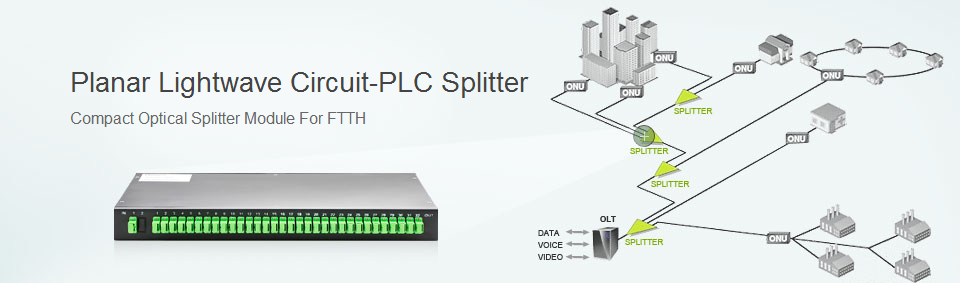
    PON system has expanded extensively as an optical network in the construction of FTTH economically. As shown in Fig. 1, PON architecture allows a signal transmitted over a single optical fiber from the telephone exchange office to be shared with multiple users, hence achieving cost reduction per subscriber. Planar Lightwave Circuit (PLC) splitter, an optical splitter is a key to realize the branching of optical signal in the telecommunication network, and currently has a maximum of 32 split ratio capability.

    PON system structure

    Installation of optical splitter is simplified with the application of latch-on or snap method that can expedite the process with quick plug-in action. This plug-and-play method is commonly applied at the interconnection points in the FTTH network (This method enables field installation of optical components without any special tools or skills in managing bare optical fibers). To effectively deploy with such simple techniques and modular designs, connectorized components are essential to be integrated in the structure design of optical splitters. In addition, flexibility of network is achieved with the application of module terminated with connector cord, which allows easy reconfiguration of the network. Furthermore, in the FTTH PON architecture, the function of Fiber Distribution Hub (FDH) is to house optical splitter outdoor, therefore the FDH is critical in ensuring high reliability against environmental factors. Due to the space constraint in the FDH, down-sizing of optical splitter module design is done. The pervasive FTTH deployment worldwide has been called for an imminent need to develop low-cost solutions. The newly developed small sized and lightweight optical splitter is made from retardant plastic resin with sturdiness comparable to the conventional metal packaging in withstanding outdoor environmental conditions, but at a fraction of its original cost. This article illustrates the development of 1×16, 1×32 and 2×32 Wavelength Division Multiplexing (WDM) optical splitter module. The characteristics and reliability evaluation will also be discussed in this article.

    2. Structure of Optical Splitter Modules

    2.1. PLC-Type Splitter

    As shown in Fig. 2, the optical fiber is being branched to 32 outputs through a 1×32 PLC-type optical splitter. PLC chip is a silica glass embedded with optical wave circuit. The circuit pattern is designed to branch a single input into multiple output channels. Optical fiber is adhered to PLC chip with resin curedby ultraviolet exposure; this interface conforms to Telcordia GR-1209 and GR-1221 test conditions, hence good reliability is ensured. Furthermore, inorder to actualize the size reduction, bend insensitive Single Mode Fiber (SMF) has been introduced into this module.

    1x32 PLC Splitter

    2.2. Flame Retardant Plastic Package

    The structure of optical splitter module developed is shown in Fig. 3. Bend insensitive fiber with bending radius of 15 mm is applied to the optical splitter module to achieve a considerable size reduction of the packed module. The overall dimension of L118mm×D87 mm×H13 mm is 3/5 of the size of the conventional optical module utilizing SMF of bending radius 30 mm. In addition, as a flame retardant plastic resin has replaced metallic materialin the splitter packaging, the weight decreases to 1/3 of the conventional metallic packaging version.

    1x32 splitter external structure

    Figure 4 illustrates the internal configuration of the optical splitter module. The splitter module is terminated with optical connector pigtails. The 2 mm fiber cords are fixed onto the cable retainer with adhesive.This structure is designed to withstand tensile strength of maximum 68.6 N. Moreover, as the optical cord has a similar structure to the loose tube cables, allowing the optical fiber free movement within the cord effects the expansion and contraction of the optical cord that will not exert any external tension onto the fiber.

    1x32 splitter internal structure

    The structure of strain relief boot is shown in Fig.5. The boot is designed to control the bending radius to a minimum of optical fiber limit, i.e., 15 mm. This prevents an increase in attenuation brought upon by fiber bend. The flexible boot developed has taken factors like hardness, thickness and the quantity of cord per boot into the design considerations to control the bending radius to a minimum of 15 mm when a loadis applied at 90° bend to the optical cord perpendicularly.

    strain relief boot model

    3. OPTICAL PERFORMANCE AND CHARACTERISTIC

    3.1. Functionality of FDH

    Figure 6 captures the appearance of FDH system in configuration with optical splitter module load. The hub, optical connector, and optical adapters are all mounted onto a panel to enable ease of operation with a latch mechanism. The pigtail is elegantly managed in a U-shape through the mandrel. This plug-and-play method makes installation extremely simple and efficient.

    installed splitter modules in FDH

    3.2. Fundamental Optical Characteristics

    The 1×16 and 1×32 splitter modules were fabricated to be mountable onto the above described fiber distribution hub. The vacant port (a port which is not in service) present in the FDH will result in back reflections of the optical signal. To prevent return loss from the end face of vacant port, SC connector is polished to an Angled Physical Contact (APC) interface. Data below tabulates the optical characteristics of the optical splitter module, inclusive of the connector pigtails.

    The histograms shown in Figs. 7 and 8 illustratethe insertion loss performance of 1×16 and 1×32 optical splitter module respectively. At operating wavelength 1310 nm, the average insertion loss of 1×16 splitter stands at 13.23 dB while that of 1×32 splitter is 16.33 dB. Similarly, at 1550 nm operation wavelength, the insertion loss of 1×16 and 1×32 splitter module is 13.10 dB and 16.22 dB respectively. In addition, the standard deviation of 1×16 splitter is 0.29 dB while 1×32 splitter yields a standard deviation of 0.34dB. At the same time, this value decreases to 0.23 dB for 1×16 splitter and 0.28 dB for the 1×32 splitter at wavelength 1550 nm.

    1x16 splitter insertion loss

    The performances of other optical characteristics apart from insertion loss are shown in Table 1. These results show consistent good performances, as exhibited in the insertion loss histogram, in characteristics including uniformity, return loss and PDL values.

    optical characteristics measurement

    3.3. Temperature dependent loss

    History from past experimental results has shown that components terminated with optical pigtail cord are susceptible to insertion loss fluctuation with temperature change. To isolate the effects of cordage expansion/contraction on the optical fiber within, the optical cord is designed to allow free movement of optical fiber, thus eliminating the external stress fromthe expansion/contraction of the cord. Figure 9 depicts the insertion loss variation of the 1×32 optical splitter module during temperature cycling from −40 °C to +85 °C. The average, minimum, and maximum values obtained from the 32 output ports are illustrated in the graph shown in Fig. 9. From the graph, the maximum loss deviation between the ports with maximum and minimum insertion loss is 0.17 dB. This result has an evident exceptional stability of the optical splitter module that is developed.

    1x32 splitter insertion loss temperature dependence

    3.4. Wavelength dependent loss

    The wavelength dependent loss of the 1×32 optical splitter module is shown in Fig. 10. The performances of insertion losses over wavelengths from 1260 nm to 1680 nm are measured. Again, the average loss from 32 ports and minimum and maximum wavelength dependent losses are illustrated in the graph. The average deviation is 0.36 dB while the maximum deviation from all the 32 ports is 0.86 dB.

    1x32 splitter insertion loss wavelength dependence

    This proves that the splitter module has shown resilience in insertion loss variation over a broad spectrum of wavelength.

    A variety of optical devices are stored in this optical splitter module, making it multifunctional. An example is the 2×32 WDM optical splitter module shown in Fig. 11 and the structure of its cable retainer in Fig.12. A WDM filter was built in front of a 1×32 splitter module, enabling the structure to have multiple wavelengths.

    2x32 WDM splitter configuration

    Figure 13 shows the wavelength dependent loss of the 2×32 WDM optical splitter module. With the WDM filter, the wavelength ranging from 1530nm to1570nm are transmitted from the B port, and the other wavelength ranges are transmitted from the A port. The wavelength dependent loss of A port and B port are split evenly among the 32 fibers, hence excellent loss performance is obtained in each port.

    2x32 WDM splitter insertion loss wavelength dependence

    4. Reliability of Optical Splitter Modules

    The reliability of 1×32 splitter module is evaluated in accordance to test procedures stipulated in the Telcordia GR-1209 and GR-1221. The test conditions and the results of the 1×32 splitter module measured at 1550 nm are shown in Table 2. The average, maximum, and minimum values of 32 output ports measured are recorded in Table 2. The results of side pulltest and cable retention test are maximum in-situ datamonitored during load application onto the cable cord. On the other hand, the recorded data of damp heat, temperature cycling, mechanical shock, vibration, and water immersion shows the variation of insertion loss before and after the test conditions. From the results, it is confirmed about the reliability of 1×32 splitter module.

    1x32 splitter reliability test

    The results of high temperature and humidity test are depicted in Fig. 14. The optical splitter samples underwent a total of 2000 hours of storage at 85 °C and of 85% relative humidity. Insertion loss data at 100 hrs, 168 hrs, 500 hrs, 1000 hrs, and 2000 hrs juncture were measured. The average insertion loss of the 32 ports, maximum and minimum insertion loss measured at 1550 nm are displayed in the graph. From the graph in Fig. 14, it is concluded that there is very minimal loss variation even after 2000 hrs. The optical splitter module has shown good stability when exposed to high temperature and humidity conditions.

    insertion loss variation of loss during damp heat test

    Furthermore, to meet the flame retardant requirements for optical components and accessories, we have applied frame retardant plastic material of 1.5 mm thickness complying to UL-94 V-0. On the same note, the jacket of optical fiber cord is made of grade V-0 flame retardant PVC.

    5. Conclusion

    A compact and economical optical splitter that boasts of superior optical performance and reliability against stringent environmental conditions suited for outdoor installation has been successfully developed. This plug-and-play design for installation of the above optical splitter has enabled simple and speedy installation, at the same time provided added flexibility for future network reconfigurations, thus making this optical splitter module the perfect solution for PON architecture FTTH deployment.

     

    Read more »
  • OTDR (Optical Time Domain Reflectometer) Dead Zone Tutorial


    OTDR (Optical Time Domain Reflectometer) is a familiar fiber test instrument for technicians or installers to characterize an optical fiber. To understand the specifications which may affect the performance of OTDR can help users get maximum performance from their OTDRs. This tutorial will introduce one of the key specifications—Dead Zone.

    What Is a Dead Zone?

    The OTDR dead zone refers to the distance (or time) where the OTDR cannot detect or precisely localize any event or artifact on the fiber link. It is always prominent at the very beginning of a trace or at any other high reflectance event.

    OTDR_Trace
    Why makes a Dead Zone occur?

    OTDR dead zone is caused by a Fresnel reflection (mainly caused by air gap at OTDR connection) and the subsequent recovery time of the OTDR detector. When a strong reflection occurs, the power received by the photodiode can be more than 4,000 times higher than the backscattered power, which causes detector inside of OTDR to become saturated with reflected light. Thus, it needs time to recover from its saturated condition. During the recovering time, it can not detect the backscattered signal accurately which results in corresponding dead zone on OTDR trace. This is like when your eyes need to recover from looking at the bright sun or the flash of a camera. In general, the higher the reflectance, the longer the dead zone is. Additionally, dead zone is also influenced by the pulse width. A longer pulse width can increase the dynamic range which results in a longer dead zone.

    OTDR connection
    Event Dead Zones & Attenuation Dead Zone

    In general, dead zones on an OTDR trace can be divided into event dead zone and attenuation dead zone.

    OTDR_dead_zone
    Event Dead Zone

    The event dead zone is the minimum distance between the beginning of one reflective event and the point where a consecutive reflective event can be detected. According to the Telcordia definition, event dead zone is the location where the falling edge of the first reflection is 1.5 dB down from the top of the first reflection.

    EDZ
    Attenuation Dead Zone

    The attenuation dead zone is the minimum distance after which a consecutive non-reflective event can be detected and measured. According to the Telcordia definition, it is the location where the signal is within 0.5 dB above or below the backscatter line that follows the first pulse. Thus, the attenuation dead zone specification is always larger than the event dead zone specification.

    ADZ

    Note: In general, to avoid problems caused by the dead zone, a launch cable of sufficient length is always used when testing cables which allows the OTDR trace to settle down after the test pulse is sent into the fiber so that users can analyze the beginning of the cable they are testing.

    The Importance of Dead Zones

    OTDR_testThere is always at least one dead zone in every fiber—where it is connected to the OTDR. The existence of dead zones is an important drawback for OTDR, specially in short-haul applications with a large number of fiber optic components. Thus, it is important to minimize the effects of dead zones wherever possible.

    As mentioned above, dead zones can be reduced by using a lower pulse width, but it will decrease the dynamic range. Thus, it is important to select the right pulse width for the link under test when characterizing a network or a fiber. In general, short pulse width, short dead zone and low power are used for premises fiber testing and troubleshooting to test short links where events are closely spaced, while a long pulse width, long dead zone and high power are used for long-haul fiber testing and communication to reach further distances for longer networks or high-loss networks.

    The shortest-possible event dead zone allows the OTDR to detect closely spaced events in the link. For instance, testing fibers in premises networks (particularly in data centers) requires an OTDR with short event dead zones since the patch cords of the fiber link are often very short. If the dead zones are too long, some connectors may be missed and will not be identified by the technicians, which makes it harder to locate a potential problem.

    Short attenuation dead zones enable the OTDR not only to detect a consecutive event but also to return the loss of closely spaced events. For instance, the loss of a short patch cord within a network can now be known, which helps technicians to have a clear picture of what is actually inside the link.

    Summary

    OTDR is one of the most versatile and widely used fiber optic test equipment which offers users a quick, accurate way to measure insertion loss and shows the overview of the whole system you test. Dead zone, with two general types, is an important specification of OTDR. It is necessary for users to understand dead zone and select the right configuration in order to get maximum OTDR performance during test. In addition, OTDRs of different brands are designed with different minimum dead zone parameters since manufacturers use different testing conditions to measure the dead zones. Users should choose the suitable one according to the requirements and pay particular attention to the pulse width and the reflection value.


    Read more »
RSS